Turn slow sales pipelines into rapid deal closures with a HubSpot architecture built specifically for mobile app development agencies.
Mobile app development agencies often lose winnable deals for one simple reason: speed. When a prospect requests a proposal for an iOS, Android, or cross-platform application, momentum is critical. A slow proposal process gives that prospect time to evaluate two competing agencies and hire whoever delivers first.
Setting up HubSpot for mobile app development agencies transforms how fast your team turns discovery calls into signed statements of work (SOW). By structuring technical scoping inputs directly inside your CRM, you compress proposal turnaround times from days to hours.
Why Mobile App Agencies Lose Deals in the Discovery Gap
Speed wins deals when prospective clients are actively interviewing multiple software partners.
Every day that passes between an initial discovery call and a delivered statement of work reduces your chances of winning the project. Most app agencies assume they lose deals over pricing or technical limits. In reality, internal friction causes most lost opportunities: unstandardized call notes, manual estimation meetings, and writing scope documents from scratch.
When your sales team spends three days turning raw notes into a custom quote, your prospect is already reviewing pitch decks from faster competitors. App agencies must build a structured, repeatable sales process. You can explore our complete HubSpot CRM implementation services to see how automated sales systems accelerate agency growth.
Standardizing Discovery Call Notes as Deal Properties
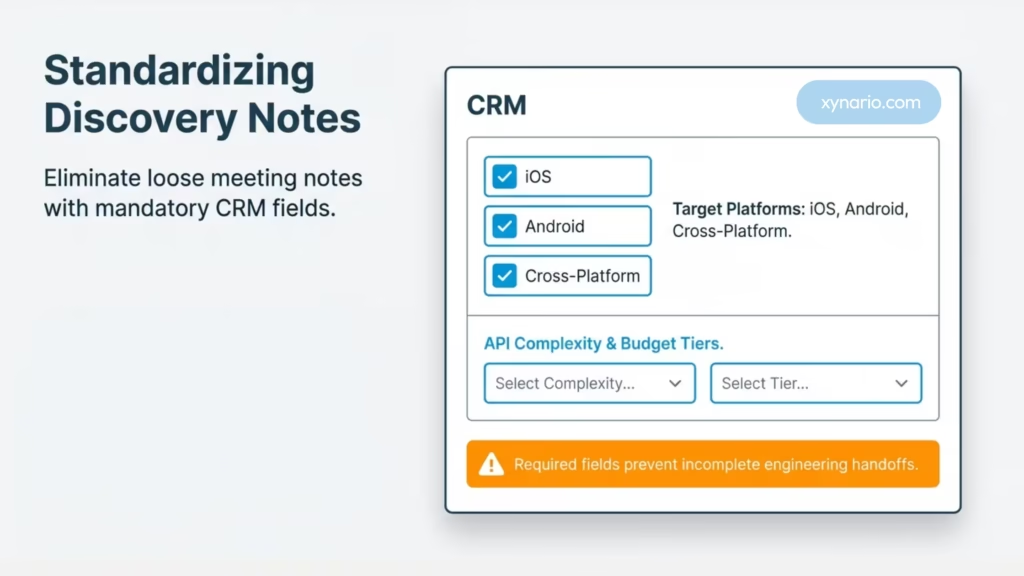
Replace free-text meeting notes by embedding technical scoping parameters directly into your CRM deal record.
To speed up scope generation, remove loose meeting notes stored in separate documents. Instead, structure your sales intake around mandatory deal fields inside HubSpot Sales Hub.
During or immediately after a discovery call, your account representative must fill out mandatory fields before moving a deal to the “Scoping Required” stage:
- Target Platforms: iOS Native, Android Native, React Native, Flutter, Web App.
- Core App Features: User Authentication, In-App Purchases, Custom Backend API, Real-Time Chat, Push Notifications.
- Technical Complexity: Low (MVP build), Medium (Custom API integrations), High (Enterprise security and legacy systems).
- Budget and Timeline: Explicit parameters to ensure resource availability.
💡 Pro-Tip: Make these custom properties required fields in HubSpot before a deal moves to the Scoping stage. This stops sales representatives from handing incomplete details to your engineering team.
Converting conversation details into structured data fields removes the need for long internal handoff meetings. For a detailed breakdown on pipeline setup, read our guide on HubSpot Sales Hub automation best practices.
Templated Proposal Generation and CPQ Integration
Cut proposal drafting time from three days down to under two hours using pre-mapped templates.
Once your technical requirements live in structured deal fields, generating an SOW becomes an automated task rather than a long writing assignment.
HubSpot native quotes, along with document tools like PandaDoc Document Automation and DealHub, pull CRM data directly into custom proposal templates.
Key Elements of an Automated Agency SOW Template:
- Dynamic Scope Blocks: Display pre-written feature descriptions automatically based on selected deal properties (for example, authentication text inserts automatically when “OAuth 2.0” is selected).
- Standard Milestone Schedules: Map budget tiers directly to payment phases (such as 40% Deposit, 30% Beta Milestone, and 30% App Store Launch).
- Pre-Built Signature Blocks: Keep signature lines ready so prospects can sign immediately upon delivery.
Segmenting Deals by Platform and Technical Complexity
Avoid treating a simple cross-platform MVP project the same as an enterprise native build.
Not every mobile app contract requires a long technical review. Tagging deals by target platform and complexity level lets you set up automated routing rules in HubSpot.
- Tier 1 (Standard Builds): Fixed-scope projects using standard tech frameworks (for example, Flutter with Firebase). These trigger an immediate automated proposal template for same-day delivery.
- Tier 2 (Enterprise Systems): High-complexity builds requiring custom microservices, third-party ERP connections, or strict compliance standards. These route automatically to a Senior Solutions Architect with a clear task deadline.
Segmenting your deals keeps simple builds moving forward without waiting behind complex enterprise reviews. Learn more about optimizing multi-tier sales pipelines in our guide to agency sales pipeline optimization.
Automating Follow-Ups and Engagement Tracking
Keep sales momentum high by building trigger-based follow-up sequences in your CRM.
Once an SOW is sent, delays can kill the deal. Relying on manual calendar reminders often leads to missed opportunities. Combining proposal view alerts with HubSpot Workflows gives you real-time visibility into prospect activity.
Recommended Follow-Up Sequence:
- Immediate (Day 0): Automated email confirming proposal delivery with a direct link to schedule a review call.
- Engagement Triggers: When a prospect opens the proposal more than three times or views the pricing page for over three minutes, trigger an instant notification for the sales representative to reach out.
- Day 2 Check-in: Automated, personal message answering common questions regarding code ownership and app store publishing guidelines (referencing official standards like Apple Developer Documentation).
- Day 5 Decision Update: Gentle automated update pointing out production schedule limits to encourage a decision.
💡 Pro-Tip: Combine engagement alerts with official guidelines from HubSpot Knowledge Base to automatically pause follow-up sequences as soon as a prospect opens an e-signature session.
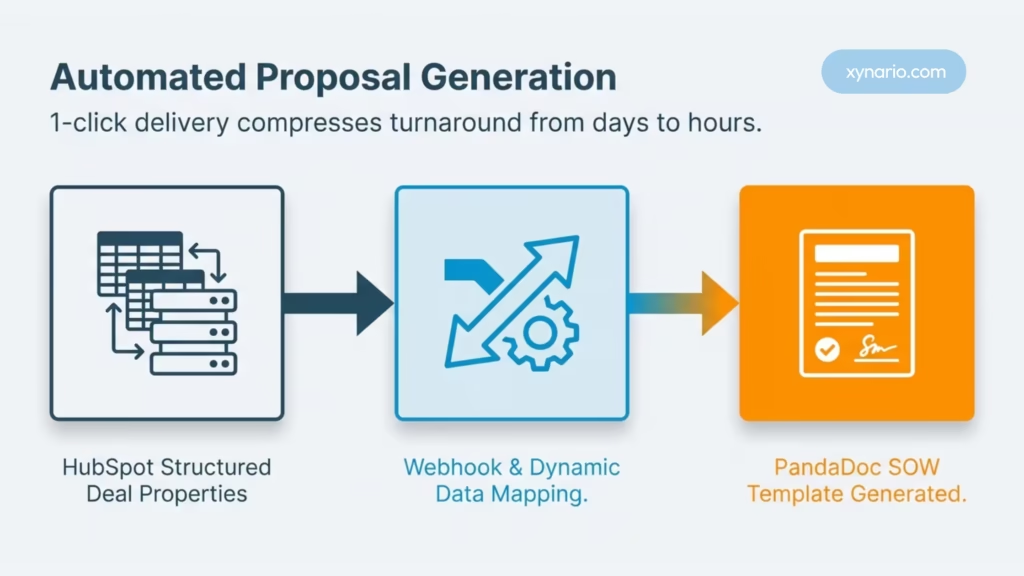
Seamless Client Onboarding: Handing Off Sales to Engineering
Connect your business development team with engineering without losing key technical specifications.
Closing a deal is only the first step. Starting the project smoothly builds lasting client trust. A common issue for app development agencies is the gap between sales handoffs and project execution.
When a deal moves to “Closed-Won”, a HubSpot workflow should trigger this automated handoff process:
- Project Management Creation: Automatically create a new project board in Atlassian Jira or Asana using webhooks, populating core tasks from your CRM scoping fields.
- Team Notification: Send a summary message to your team channel in Slack or Microsoft Teams with the signed SOW, scope summary, target delivery dates, and client contacts.
- Client Onboarding Email: Send an instant welcome email giving the client access to submit design assets, API keys, and app store account access.
Measuring Proposal-to-Close Velocity in HubSpot
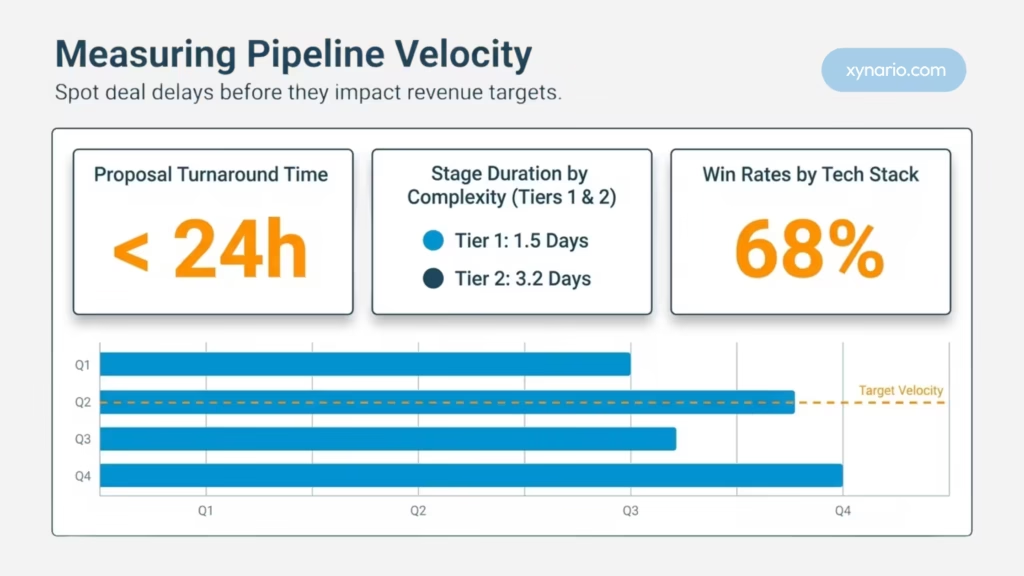
Use custom reporting dashboards to spot deal delays before they impact your quarterly revenue targets.
To improve your sales operations, you must measure every step of your pipeline. Operating on guesses hides operational friction.
Set up custom HubSpot reporting dashboards to track these critical sales metrics:
- Proposal Turnaround Time: Total hours elapsed between “Discovery Call Completed” and “SOW Sent”. Target benchmark: under 24 hours for Tier 1, under 72 hours for Tier 2.
- Stage Duration: Average time deals remain in the “Scoping in Progress” stage.
- Win Rate by Tech Stack: Discover if your agency closes React Native deals faster than native iOS projects, showing where your sales messaging or pricing works best.
Reviewing these reports monthly helps you locate pipeline bottlenecks and refine your scoping templates.