
Most plumbing, HVAC, mechanical, and roofing companies run their business on a patchwork system: a field service tool for dispatch, a spreadsheet for leads, a shared inbox for follow-ups, and a whiteboard for “who is calling who back.” It works until the business crosses 15 to 20 employees. At that threshold, leads go cold, technicians get double-booked, and nobody can tell you which marketing channel actually produces paying jobs.
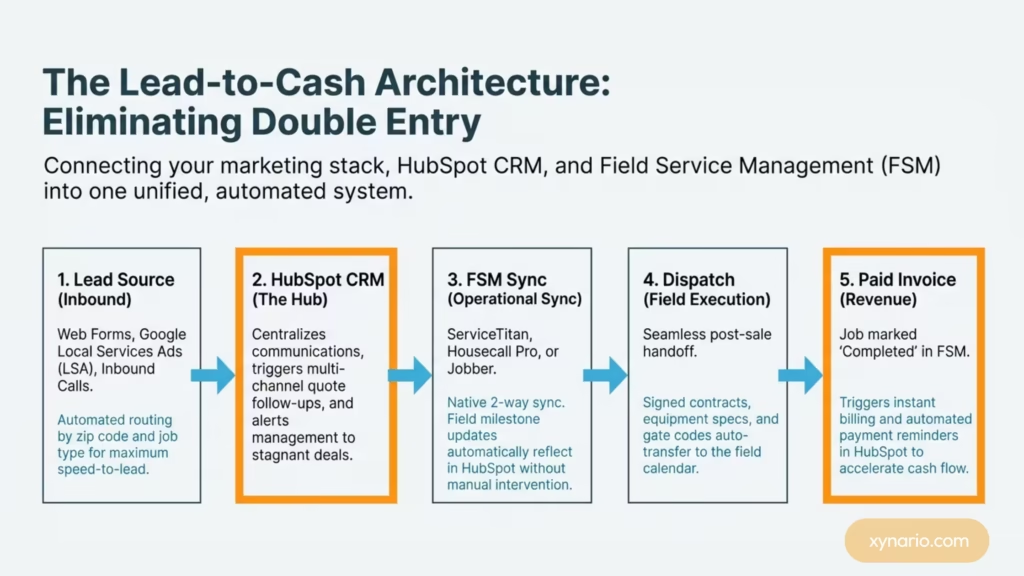
HubSpot fixes this, but only if it is implemented around how a trade business actually sells, not around a generic B2B SaaS template. In this guide, we break down the exact blueprint for aligning HubSpot for field service companies to drive predictable revenue and total operational visibility.
Why Field Service Businesses Need a Customized CRM Setup
Standard B2B sales pipelines fail when your revenue relies on immediate emergency dispatches.
A standard CRM setup, the kind built for software companies or corporate consulting, simply does not translate to plumbing, HVAC, mechanical, or roofing work. In the trades, your “leads” are often urgent emergency calls. Your “deals” are physical jobs with field technicians attached, not long email chains. Furthermore, your sales cycle might last five minutes for a residential drain clearing or five weeks for a full commercial HVAC replacement.
That is why a proper implementation guide built on custom HubSpot partner solutions must start with your physical operational workflow rather than default CRM settings.
What Makes Field Service Sales Fundamentally Different
From emergency calls to multi-week system installs, traditional SaaS CRM flows simply do not match trade workflows.
Trade contractors face operational realities that standard sales systems ignore:
- Asynchronous Communication: Field technicians produce quote data in the field, while back-office staff manages customer communication.
- Geographic Constraints: Revenue depends on technician travel radii and service zone profitability.
- Variable Urgency: High-margin replacement quotes require structured multi-week nurturing, whereas service repair calls demand immediate dispatch.
8-Step HubSpot Implementation Framework for Trade Contractors
A battle-tested setup engineered specifically to convert calls into paid invoices without manual data entry.
| Implementation Step | Operational Objective | Primary CRM Action / Integration |
|---|---|---|
| Step 1: Pipeline Mapping | Align deal stages with physical job milestones | Build custom stages from Request to Invoiced |
| Step 2: Automated Routing | Maximize speed-to-lead on inbound requests | Auto-assign leads by zip code and job type |
| Step 3: FSM Software Sync | Eliminate double entry between office and field | Connect ServiceTitan / Jobber via 2-way sync |
| Step 4: Quote Automation | Prevent pending proposals from going cold | Trigger timed multi-channel email/SMS nudges |
| Step 5: Dispatch Handoff | Push accepted jobs to field calendar | Auto-transfer scope, gate codes, and contract notes |
| Step 6: Billing Automation | Accelerate cash flow upon job completion | Fire automated invoice notifications on job close |
| Step 7: Custom Objects | Manage commercial & multi-site accounts | Link multiple Property records to one Parent Company |
| Step 8: Management Escalation | Prevent stagnant leads and overdue invoices | Send automated manager alerts for stale deals |
Step 1: Build Your Pipeline Around Real Job Stages
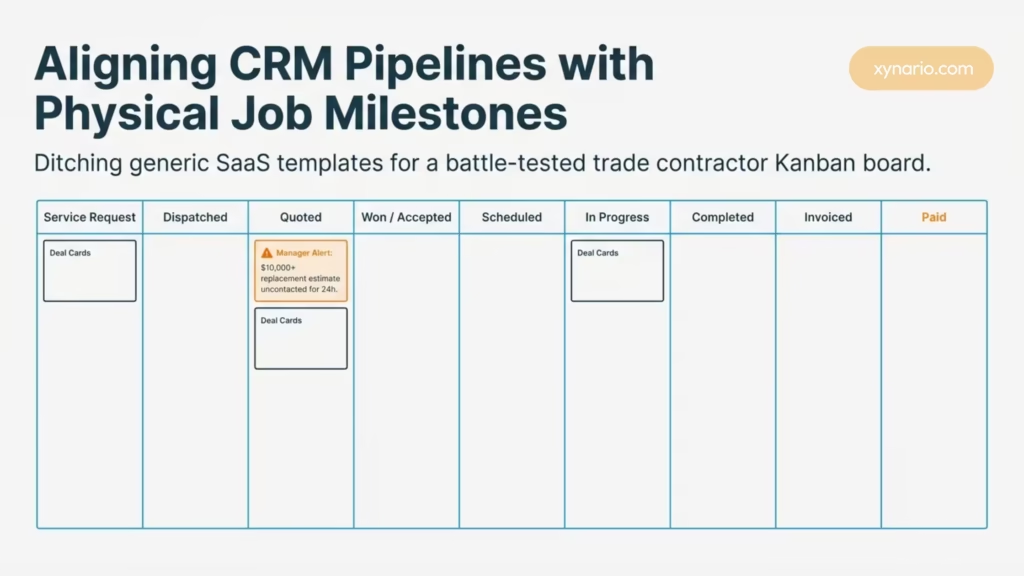
Aligning CRM stages with actual field workflows is the difference between clean metrics and pure pipeline fiction.
Before setting up automation, your pipeline must accurately reflect how a job moves from initial contact to final payment. For most contractors, those stages look like: Service Request → Dispatched → Quoted → Won / Accepted → Scheduled → In Progress → Completed → Invoiced → Paid
Pro-Tip Block: Avoiding Pipeline Distortion
Do not mark a job as “Closed Won” the moment an estimate is signed. Keep the deal in “Won / Pending Execution” until the work is completed and verified by dispatch. This keeps your active backlog metrics accurate.
Step 2: Set Up Automated Routing by Service Area and Job Type
Speed-to-lead decides who wins the job when emergency repairs hit your dispatch queue.
For a CRM setup handling plumbing and HVAC operations, speed is everything. Set up automated workflow rules that assign incoming web forms and call logs based on zip code, service area, and job classification (e.g., Residential Repair vs. Commercial Install). Getting this right eliminates one of the most costly mistakes in the industry: losing a $10,000 job because a request sat in an unmonitored inbox for two hours.
Step 3: Connect HubSpot to Your Field Service Management Software
Eliminate double entry by bridging the gap between back-office sales and field technicians.
HubSpot works best when connected directly to your operational software. Using native tools or custom API connectors via the HubSpot App Marketplace, bridge HubSpot with your Field Service Management (FSM) platform, such as ServiceTitan, Housecall Pro, or Jobber. When a technician updates a job status in the field, that milestone should automatically update the deal in HubSpot without manual intervention.
Step 4: Automate Quote Follow-Ups to Eliminate Cold Leads
Stop leaving thousands of dollars in pending estimates on the table with automated nudges.
Unanswered proposals represent huge lost revenue for trade businesses. Once an estimate is sent out, trigger a timed follow-up sequence in HubSpot:
- Day 0: Instant SMS and email confirmation with quote link and financing options.
- Day 2: Gentle check-in email answering common installation FAQs.
- Day 5: Final follow-up email and internal task creation for the account representative to call the customer.
By deploying B2B email marketing workflows, contractors routinely recover 15% to 20% of quotes that would otherwise go unanswered.
Step 5: Streamline Post-Sale Job Handoffs to Dispatch
Seamlessly transition won deals to dispatchers without retyping job details or client history.
When a customer accepts a proposal, the sales process ends, and field execution begins. Configure HubSpot workflows to push signed customer contract details, property notes, equipment specs, and gate codes directly into your FSM dispatch calendar. This prevents miscommunication between account managers and field technicians.
Step 6: Automate Invoicing and Payment Reminders
Accelerate cash flow by triggering instant billing and automated follow-ups upon job completion.
For commercial mechanical and roofing contractors where project invoices run into tens of thousands of dollars, delayed payments choke cash flow. When an FSM tool marks a job “Completed,” HubSpot can trigger an instant invoice notification. If the balance remains unpaid after 7, 14, or 30 days, automated reminder emails and manager alerts keep accounts receivable under control.
Step 7: Leverage Custom Objects for Multi-Property and Commercial Clients
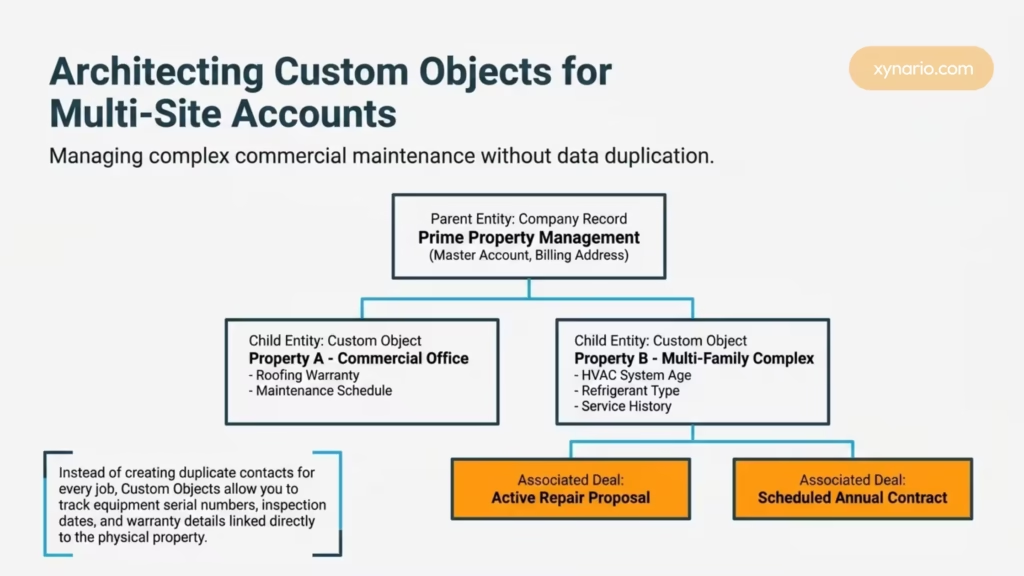
Manage complex commercial contracts and multi-site maintenance plans without creating duplicate records.
Property managers and commercial clients generate multiple service jobs across different physical locations. Instead of creating duplicate contacts for every job, leverage Custom Objects. For an in-depth strategy on structuring CRM data architectures, review our guide on ecommerce and custom object strategies.
| Data Level | Record Entity | Associated Details |
|---|---|---|
| Parent Entity | Company Record | Prime Property Management (Billing Address, Master Account) |
| Child Entity 1 | Custom Object: Property A | Commercial Office (Roofing Warranty, Maintenance Schedule) |
| Child Entity 2 | Custom Object: Property B | Multi-Family Complex (HVAC System Age, Service History) |
| Execution | Associated Deals | Active Repair Proposals & Scheduled Annual Contracts |
Pro-Tip Block: Maintenance Contract Tracking
Use Custom Objects to store equipment serial numbers, last inspection dates, and warranty expiration details linked directly to the physical property.
Step 8: Configure Executive Management Alerts and Escalations
Gain total visibility over stagnant estimates and uncollected invoices before revenue slips away.
A successful implementation relies on real-time visibility. Through tailored CRM and automation services, build dashboard notifications and internal Slack or email alerts for management when:
- A high-value replacement estimate ($10,000+) remains uncontacted for over 24 hours.
- A job is marked “Completed,” but no invoice has been issued within 48 hours.
- A commercial customer’s payment passes 15 days overdue.
Closed-Loop Marketing Attribution: Track Every Dollar
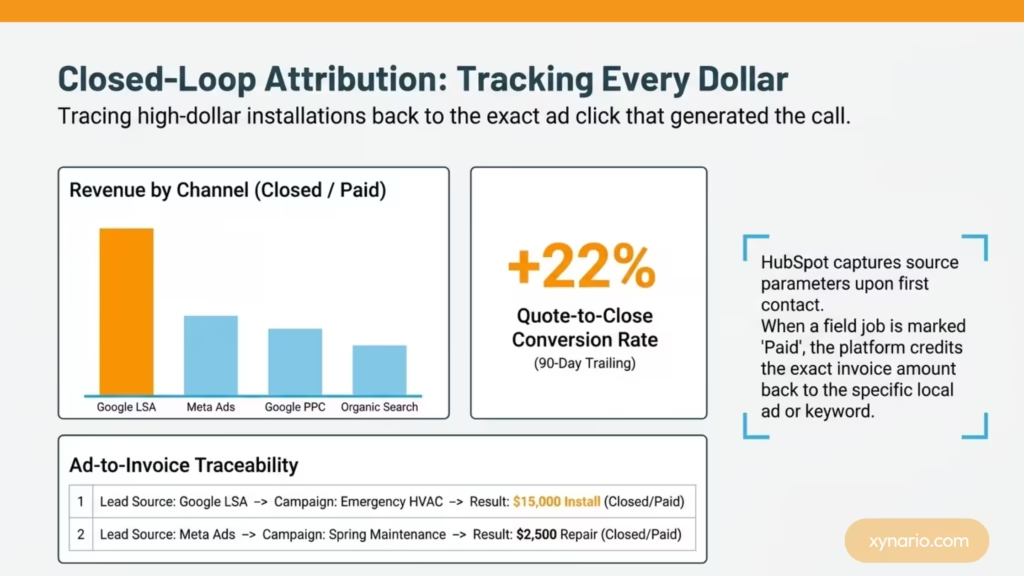
Trace every high-dollar installation back to the exact ad campaign or organic channel that produced it.
The biggest marketing complaint from trade executives is simple: “I don’t know which ads are making me money.” By connecting Google Ads, Meta Ads, and your Google Local Services Ads setup directly to HubSpot, you achieve full closed-loop attribution.
When a lead calls or fills out a form, HubSpot captures the source data. When that lead eventually converts into a $15,000 HVAC installation three weeks later, your dashboard ties that exact revenue back to the specific campaign, keyword, or local ad that generated the call.
Getting It Right the First Time: Avoiding Implementation Pitfalls
Successful implementation isn’t about fitting into HubSpot; it’s about making HubSpot fit the trades.
Many trade contractors attempt to implement HubSpot in-house, run into friction, and conclude that HubSpot does not work for field service. In almost every case, the software was not the problem; the configuration was.
When your sales pipelines, software integrations, and follow-up automations reflect how trade work actually gets quoted, scheduled, executed, and billed, HubSpot becomes the growth engine for your entire business. Explore our latest insights on the Xynario blogs page to learn more about scaling trade CRM platforms.