
Stop letting internal communication gaps delay your sales pipeline.
Sales reps frequently tell clients that a new feature is almost ready without knowing the actual truth. Your engineering teams live inside Jira. Your sales and customer success teams live inside HubSpot. A massive gap exists between these two platforms. Because of this gap, nobody knows the exact status of a project.
A reliable Jira HubSpot integration fixes this exact problem. It links the technical side of your business directly to the CRM your sales team uses every day. This connection syncs tickets, sprints, and bug reports directly to customer records.
Let us break down why this bidirectional sync matters and how you can set it up to scale your operations.
Why You Need to Sync Jira With HubSpot
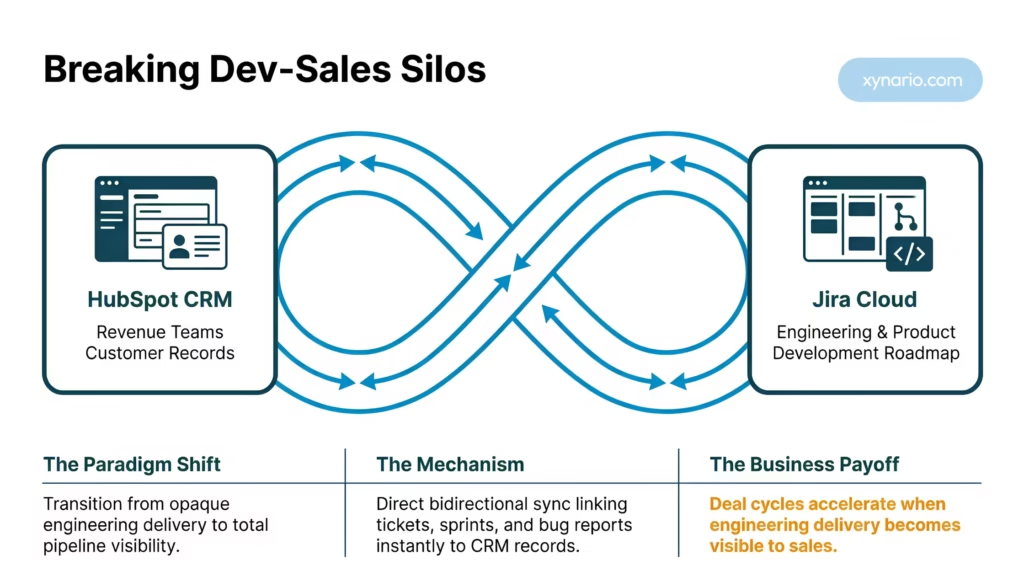
When account executives operate in the dark, customer trust takes a massive hit.
Imagine a high-value customer asking their account manager for an update on a promised feature. The account manager has no idea where the feature stands in the development cycle. They send a Slack message to the lead engineer, wait three hours for a reply, and then pass a vague update back to the customer.
If you multiply that delay by dozens of tickets each month, you build a massive operational bottleneck. When engineering delivery remains invisible to sales, deal cycles stall. Renewals become shaky. Customers feel managed rather than supported.
Connecting Jira software to HubSpot CRM allows your team to answer client questions instantly. They never have to guess, and they never have to interrupt a developer to find out what is happening.
What a Jira HubSpot Integration Actually Does
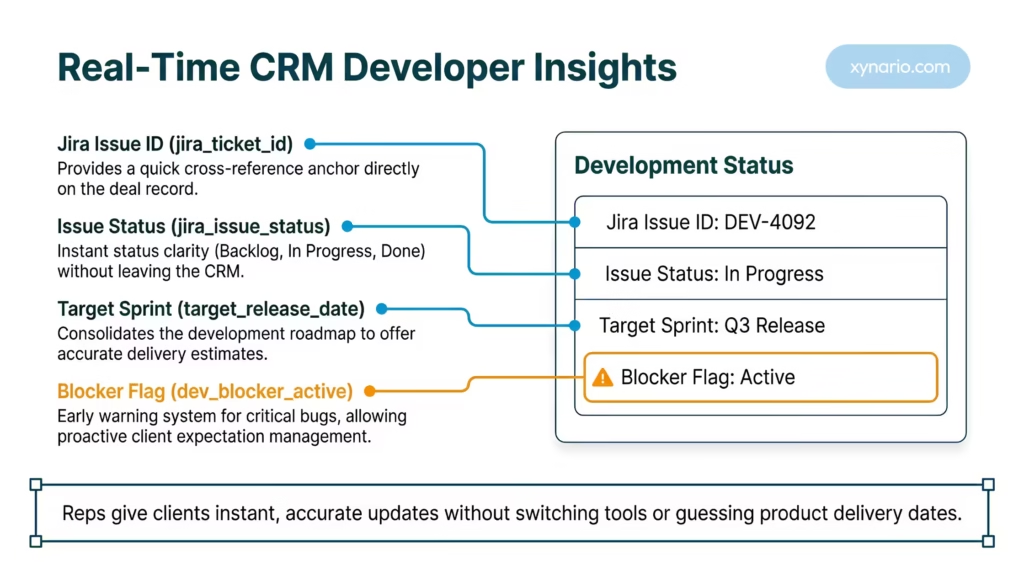
Consolidate your entire development roadmap into standard CRM data.
At a basic level, this Jira HubSpot Integration pulls critical information from Jira directly into HubSpot CRM. It takes Jira ticket statuses, issue keys, and sprint progress, then ties that data to a specific HubSpot deal, company, or contact record.
Instead of requiring five different tool logins to track a client request, a sales rep simply opens the HubSpot deal panel. Right on the screen, they can see:
- The current Jira ticket status.
- Which sprint the feature belongs to.
- The developer assigned to the task.
- The target release date.
Automation drives this entire process. Using secure APIs, data flows between platforms instantly. Nobody has to copy and paste updates manually.
Key Data Fields to Map Between Teams
Filter your technical data, so reps stay informed without feeling overwhelmed.
| Field Name | Source System | Target HubSpot Property | Primary Sales Benefit |
|---|---|---|---|
| Jira Issue ID | Jira Cloud | jira_ticket_id | Provides a quick cross-reference anchor on deal records. |
| Issue Status | Jira Cloud | jira_issue_status | Gives instant clarity (Backlog, In Progress, Done). |
| Target Sprint | Jira Cloud | target_release_date | Offers accurate delivery estimates for prospect updates. |
| Blocker Flag | Jira Cloud | dev_blocker_active | Acts as an early warning system if critical bugs emerge. |
Native App vs. Custom Jira HubSpot Integration
Choose the right setup based on your technical complexity and budget.
You have two main paths to connect these platforms. You can use the native application, or you can build a custom workflow.
Using the Atlassian Marketplace App
The HubSpot CRM Connector for Jira is a fast, reliable starting point. This native app allows you to view HubSpot contacts, companies, and deals directly inside your Jira workspace. It requires no coding and takes about 15 minutes to configure. This route works perfectly for smaller teams that just need basic visibility.
Building Custom Workflows with HubSpot Operations Hub
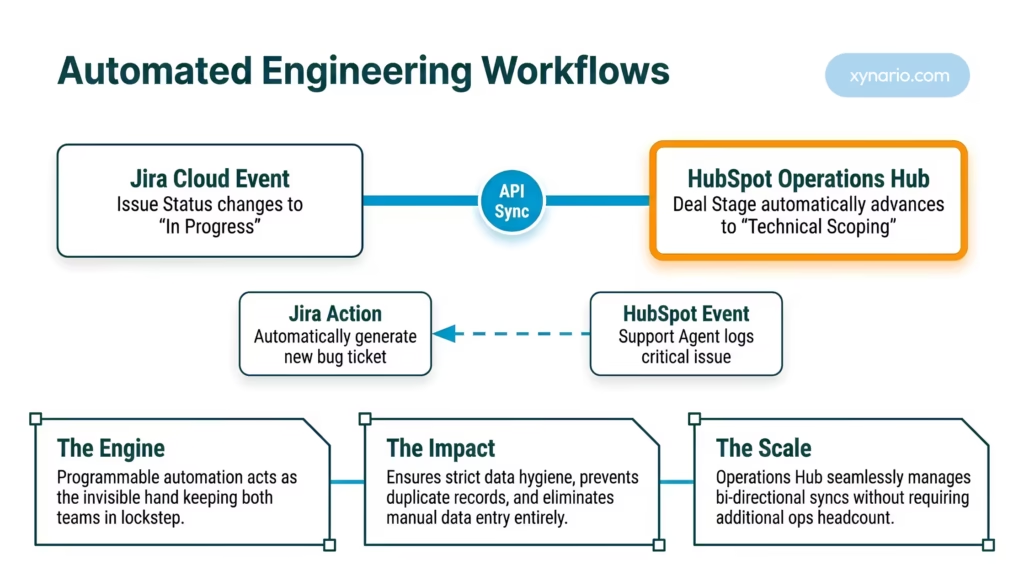
When businesses scale, basic data viewing is no longer enough. You need programmable automation. This is where HubSpot Operations Hub becomes essential.
Operations Hub lets you build custom rules. For example, when a Jira ticket status changes to “In Progress”, a custom workflow can automatically advance a HubSpot deal stage to “Technical Scoping”. This ensures strict data hygiene and prevents duplicate records. If you require advanced bi-directional syncs and custom property mapping, you need a custom build.
Step-by-Step Guide to Connect the Platforms
Follow this practical framework to link software delivery to revenue growth.
If you plan to use the official integration method, follow these steps to get started.
Step 1: Install the Integration
Authorize the connection between your CRM and your development environment.
Navigate to the HubSpot App Marketplace. Search for the Jira Data Sync app. Click Install and enter your Atlassian credentials to authorize the connection. You must have Super Admin permissions in HubSpot and active admin rights in Jira Cloud to complete this step.
Step 2: Map Jira Issues to HubSpot Deal Stages
Create dedicated property fields inside your CRM to display progress clearly.
Decide which Jira fields matter to your sales team. You do not need to sync every piece of code. Focus on actionable properties like Ticket Status, Priority, and Assignee. Map these specific Jira fields to custom properties on your HubSpot Deal or Ticket records.
Step 3: Automate Cross-Team Updates
Use workflows to trigger actions based on real-time development events.
If you have a Professional or Enterprise subscription, open your HubSpot workflow builder. You can now use the “Create Jira Issue” action. You can set a rule that automatically generates a new Jira bug ticket whenever a customer support agent logs a critical issue in HubSpot.
If you need help configuring these advanced workflows, you can explore professional HubSpot Integrations to ensure your architecture is flawless.
The Business Payoff of Connecting Jira and HubSpot
Align your product outputs with revenue generation to drive scalable growth.
Once your Jira HubSpot Integration goes live, your entire organizational culture shifts.
- Faster Deal Cycles: Sales reps pitch with confidence because they know exact product delivery dates.
- Higher Retention: Account managers proactively flag release delays before the customer even notices.
- Focused Developers: Engineering teams receive fewer interruption pings because the answers already live in HubSpot.
This Jira HubSpot Integration transforms software delivery from a hidden process into a clear, measurable business driver. To make sure your CRM setup is completely optimized, consider booking a comprehensive HubSpot Audit.